


AppSheet
AppSheet Developer for Business Apps
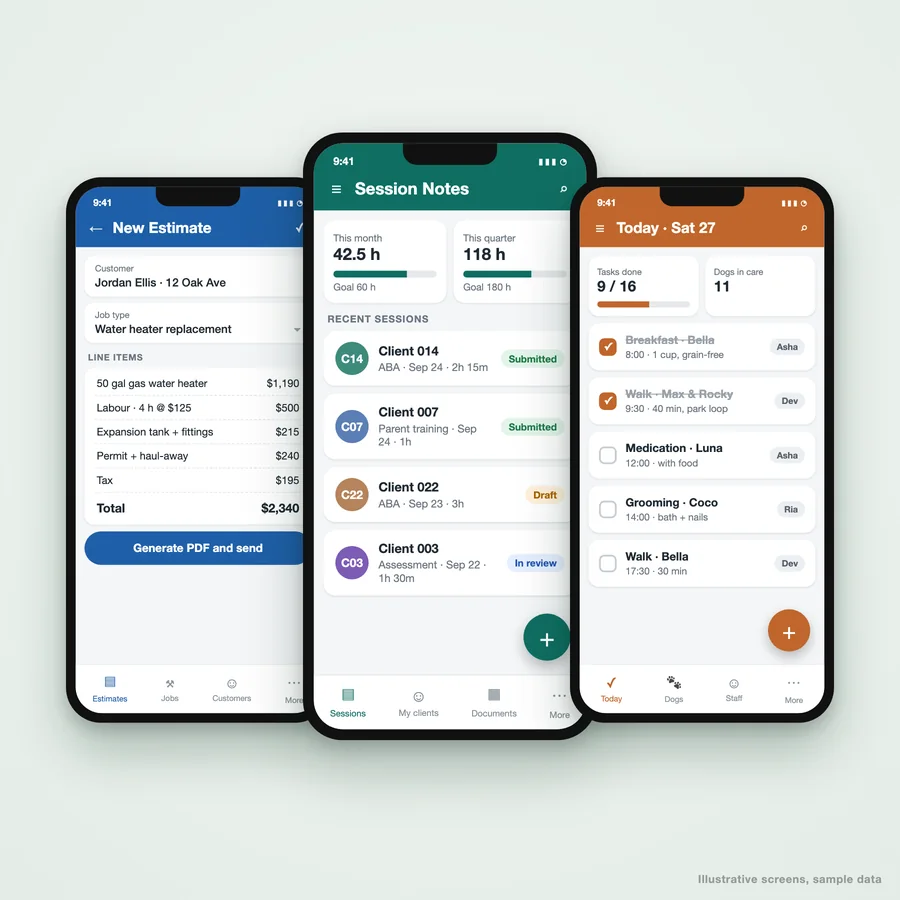
Business apps built on Google AppSheet: field forms, approvals, estimates and portals your team runs from a phone.
01
Google AppSheet apps, built around how your team already works
Most small businesses already run on a spreadsheet: jobs, clients, stock, hours. AppSheet turns that spreadsheet into a proper app, with forms, approvals, PDFs and reminders, that your team uses from a phone or a browser. No app store, no custom code to maintain.
We are the AppSheet developers you bring in when the app has to hold up in real use: data modelled so it does not break at 5,000 rows, security so each person sees only their own records, and automations that send the estimate, the invoice or the reminder without anyone remembering to. We build for clients in the US, the UK, Europe, India and Australia.
02
What we build in AppSheet
Field and mobile forms
Inspections, site visits and job sheets filled in on a phone, with photos, signatures and GPS, even without signal.
- Works offline and syncs later
- Photo and signature capture
- Required fields so nothing is skipped
Estimates, quotes and invoices
Line items priced from your own rate card, totals and tax calculated, and a branded PDF emailed to the customer in one tap.
- PDF generated from a template
- Status from draft to paid
- Automatic payment reminders
Approval workflows
Requests that route to the right person, with the history kept: purchase orders, leave, expenses, discounts.
- Approve from an email or the app
- Escalation when nobody acts
- A full audit trail
Client and case portals
Caseloads, session logs and documents for service businesses, where each staff member sees only their own clients.
- Row-level security by user
- Documents generated from records
- Hours tracked against goals
Inventory and asset tracking
Stock in and out, barcode scanning, and low-stock alerts, on the spreadsheet you already keep.
- Barcode and QR scanning
- Reorder alerts by email
- Movement history per item
Scheduling and task management
Daily checklists and assignments for teams on shifts, so the manager sees what is done without walking the floor.
- Tasks assigned by person and time
- Completion tracked live
- Recurring tasks created automatically
03
AppSheet apps we have built
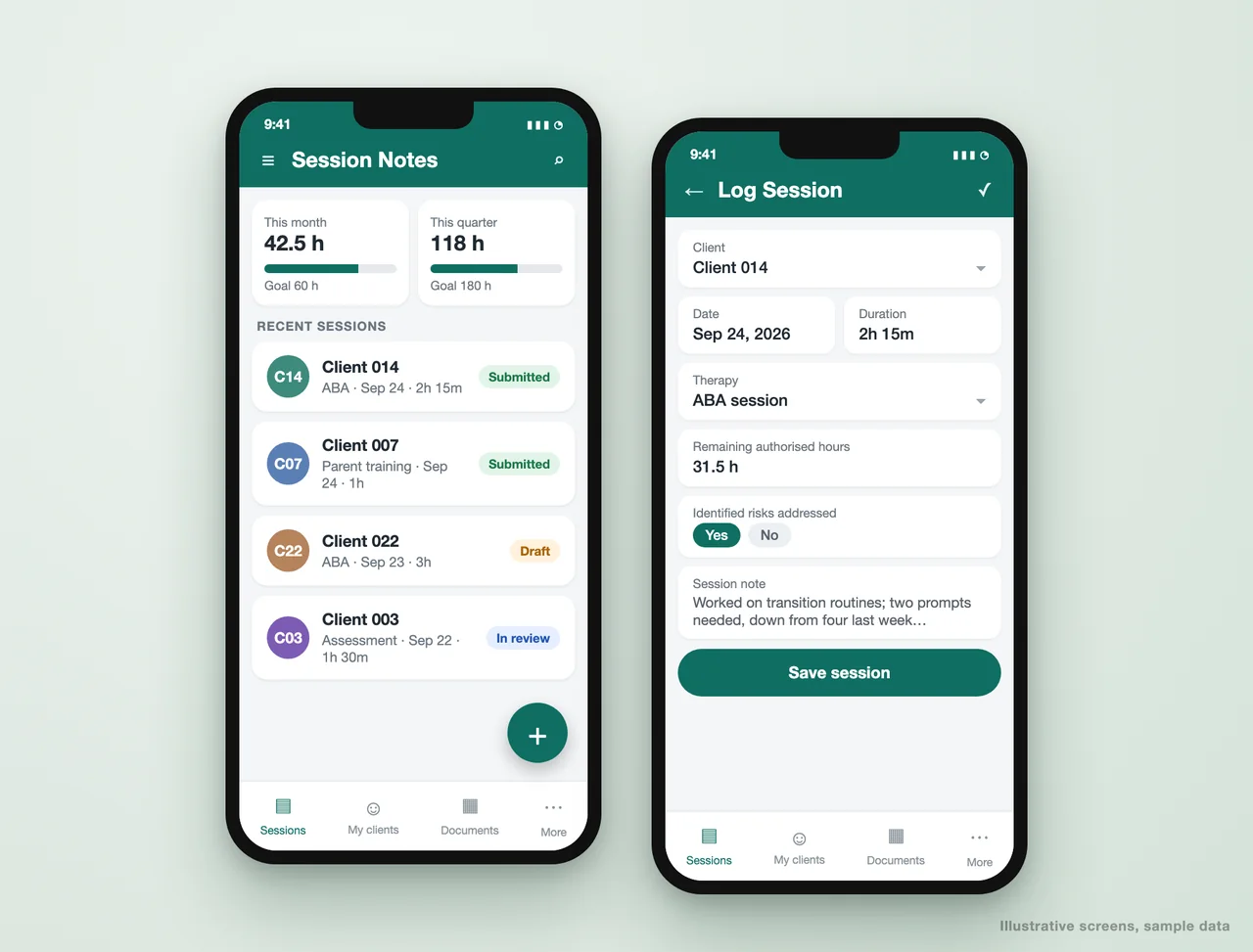
Client management portal for a therapy practice
A clinical practice ran sessions, caseloads and billing documents across spreadsheets and email. We replaced them with one AppSheet portal clinicians use every day.
- Session notes logged against authorised hours, with monthly and quarterly goals
- Each clinician sees only their own caseload; admins see the team
- Behavior Support Plans, quarterly and discharge reports generated from the record
- Reimbursements and call logs in the same app
Submission time fell from 10-15 minutes a day to under 3. Read the case study.
Estimate builder for a plumbing company
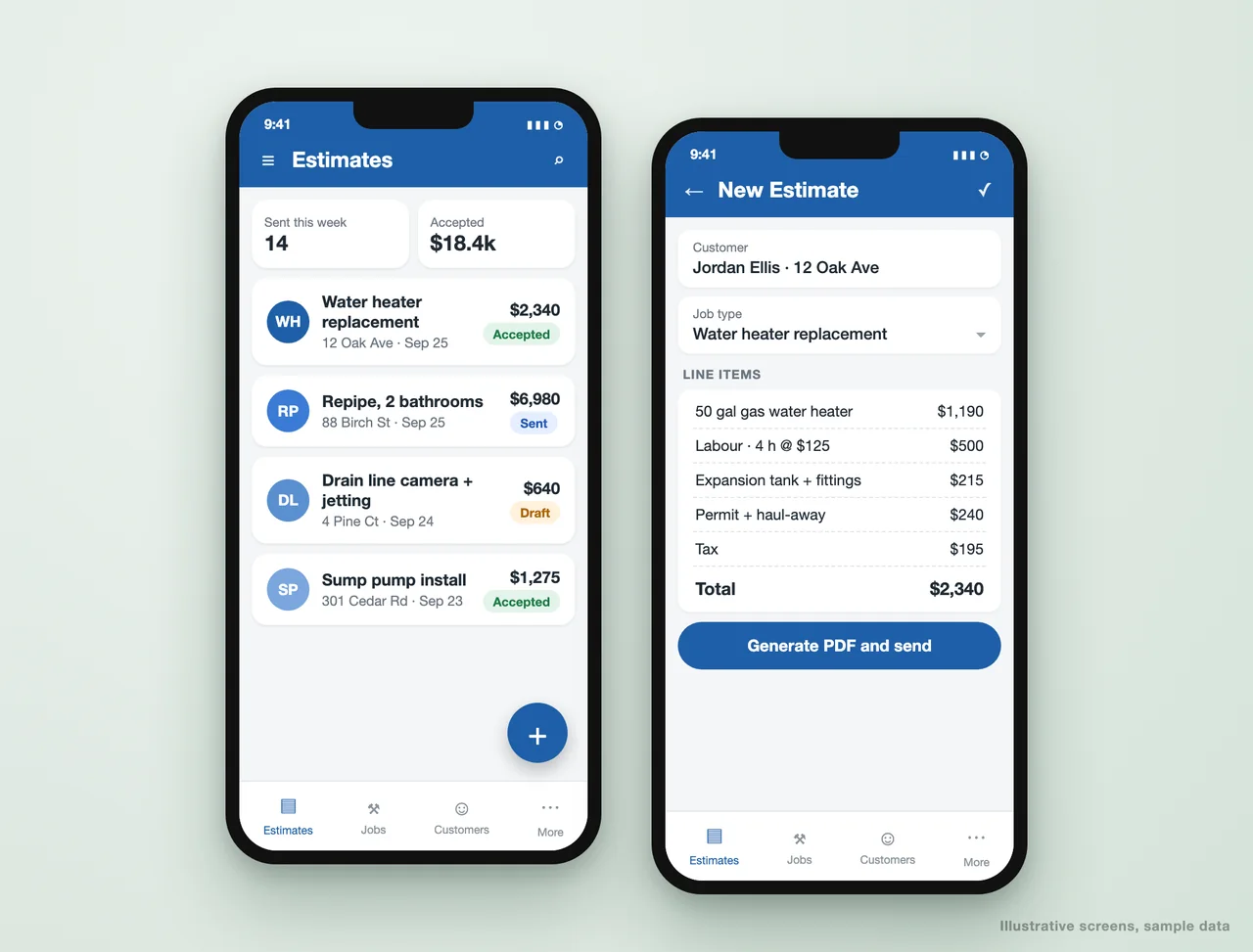
Estimates were typed up in the evening from notes taken on site. Now the plumber builds the estimate on a phone at the job and the customer has the PDF before they leave.
- Job types preload the usual parts and labour
- Prices pulled from the company's own rate card
- Estimate PDF generated and emailed in one tap
- Status tracked from draft to sent to accepted
Daily task management for a dog care business
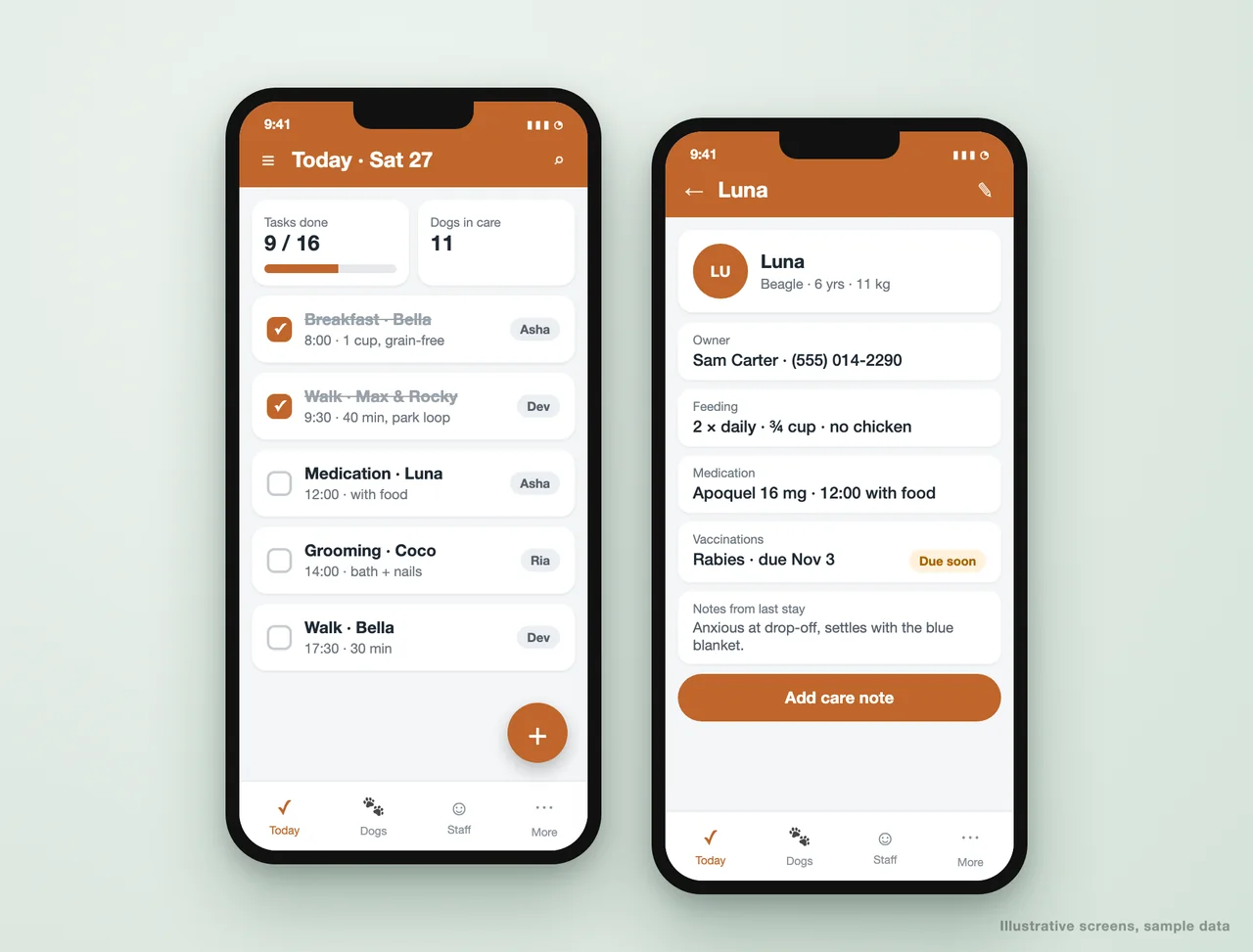
Feeding, walks, medication and grooming for every dog in care, assigned by staff member and time, so nothing is missed at shift change.
- A daily checklist built automatically from each dog's routine
- Tasks assigned to staff and ticked off live
- Profiles with feeding rules, medication and owner contacts
- Vaccination due dates flagged before they lapse
Invoicing and payment tracking
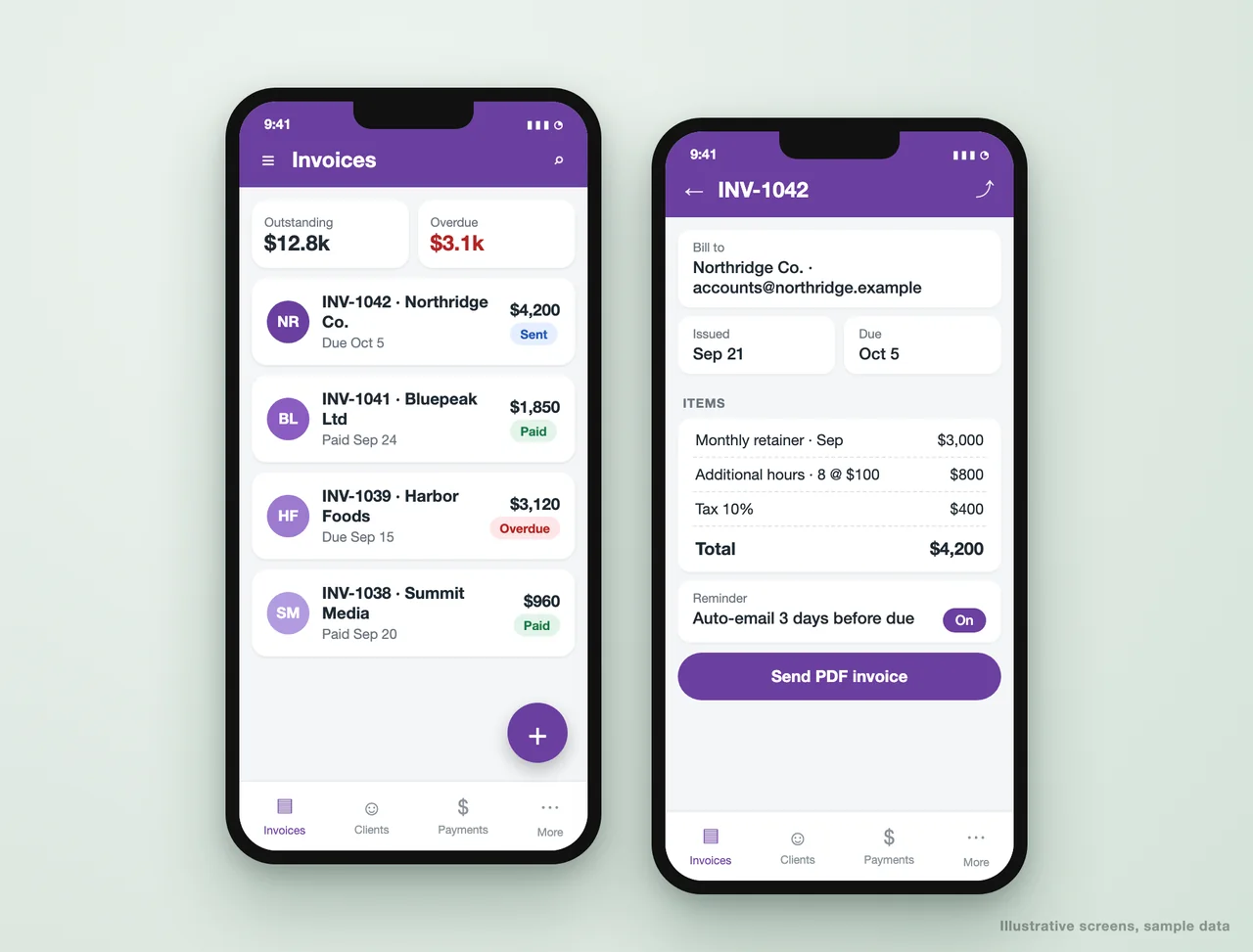
Invoices raised from the work already recorded, numbered, taxed and sent as PDFs, with what is outstanding and overdue visible at a glance.
- Invoice numbering and tax handled automatically
- PDF invoices emailed from the app
- Reminders sent before and after the due date
- Outstanding and overdue totals on the home screen
04
Where your AppSheet data can live
05
AppSheet pricing, explained
Free to build and test
Building an app costs nothing, and you can test it with up to 10 users before paying. You only pay once real users start using it.
Starter: about $5 per user a month
Enough for simple apps on Sheets or Excel with basic automation. It does not include database connectors or advanced security.
Core: about $10 per user a month
The plan most business apps need: automations, PDFs, emails and security filters. It is included with many Google Workspace business editions, so check before you buy it separately.
Enterprise Plus: about $20 per user a month
For database-backed apps, governance and machine learning features. Worth it for larger teams or regulated data.
Publisher Pro: about $50 per app a month
For public apps anyone can use without signing in, such as a customer-facing booking or request form.
06
How an AppSheet build runs
Map the work, not the screens
One call on what the team does today, who does it and what goes wrong. The app follows the job, not the other way round.
Model the data
Tables, keys and relationships set up properly, so the app stays fast and the reports agree. Most AppSheet apps that break were built on a flat sheet.
Build and test with your team
A working app on your data early, tested by the people who will use it, with a round of changes built in.
Automate the follow-ups
PDFs, emails, reminders and approvals wired in, so the app does the chasing.
Hand it over
You own the app and the data. A short guide and a walkthrough for the team, and the option of a support retainer.
07
AppSheet questions we are asked
Is AppSheet free?
What is the difference between AppSheet and Power Apps?
Does an AppSheet app work offline?
Can AppSheet create PDFs and send emails?
Do you have AppSheet templates or examples?
Who owns the app once it is built?
What if we outgrow AppSheet?
Tell us what the app has to do
Send us the spreadsheet or process your team struggles with. We will come back with how it would work in AppSheet, which plan it needs, and what the build takes.
A reply from a consultant, usually within one working day.
Part of our Business Process Automation hub. Start with our business automation services.
Business Process Automation
More on business automation services
Business Process Automation
How Business Process Automations can Benefit Businesses How Business Process Automation Works Business Process Automation involves the use of advanced technology to streamline and automate...
The ROI of Business Automation
In today’s fast-paced business world, staying competitive and maximizing profits is crucial. One way to achieve this is by leveraging the power of automation. Business automation refers to...
5 Best Practices for Business Automation
Automation has changed the game for boosting productivity, lowering human error rates, and streamlining processes in today’s fast-paced business environment. Businesses can optimize their...
How Can I Automate My Business?
In today’s fast-paced business environment, staying competitive requires efficiency, productivity, and streamlined processes. Automation has emerged as a powerful solution to achieve these...
How Business Automation Save Time and Money
In today’s fast-paced business landscape, time and money are two invaluable resources that every entrepreneur seeks to optimize. While it may seem like a daunting task, business automation...
Get started
Tell us where the week goes
Two weeks, fixed scope, a costed plan at the end. No obligation after it.
- We map your workflows and where the time actually goes
- You get the three that cost the most, with what automating them takes
- Delivered as a document, in 5 to 7 working days
Tell us where the week goes
A digital audit maps your workflows, names the three that cost the most time, and prices what it takes to automate them. No obligation after it.